

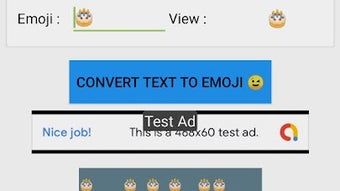
Description
Download Text to Emoji – text to emoji, emoji converter, convert text to emoji, emoji app, android app
Overview
Text to Emoji is an Android application developed by PhoenixLab designed to transform standard text messages into expressive emoji-based visuals. The software serves as a creative tool for users seeking to enhance their digital communication with vibrant, icon-driven messages. By converting plain text into sequences of emojis, the app enables users to convey emotions and ideas in a more visually engaging manner. This functionality is particularly useful in casual conversations, social media posts, and messaging apps where visual appeal adds emotional context.
The target audience includes general consumers and social media users who enjoy personalized, fun, and expressive communication. The app’s core purpose is to simplify the process of creating emoji-rich content without requiring manual selection of individual icons. Real-world usage scenarios include crafting birthday wishes, sending playful messages, creating shareable graphics for social platforms, and adding a unique touch to digital greetings. While the developer did not provide additional details about the app’s background or development philosophy, its functionality is clearly focused on user creativity and ease of expression.
Key Features & Capabilities
- Text-to-Emoji Conversion: Users can input any text string and instantly convert it into a sequence of corresponding emojis, allowing for quick and intuitive visual transformation.
- Customizable Emoji Text: The app offers options to personalize the appearance of the converted text, including adjusting layout, style, and emoji selection.
- Horizontal Flipping: A unique feature that allows users to flip the emoji text horizontally, providing creative variations for sharing or artistic purposes.
- Background Customization: Users can set custom background colors for the emoji text, enabling better visual integration with different platforms or personal preferences.
- Signature Addition: The ability to add a personal signature to the converted text helps users brand their messages or add a personal touch.
- Image Export & Sharing: Converted emoji text can be saved as an image file or shared directly via messaging apps, social media, or email, facilitating easy distribution.
These features collectively support a seamless workflow from text input to visual output, making the app ideal for users who value both creativity and convenience in their digital interactions. The app’s functionality is tailored toward enhancing personal expression in a fun and accessible way.
User Interface, Workflow & Performance
The user interface of Text to Emoji is designed for simplicity and immediate usability, focusing on a clean layout that prioritizes text input and conversion. Navigation is straightforward, with primary functions accessible from the main screen. Users can enter text, select customization options, and generate their emoji version with minimal steps, indicating a streamlined workflow.
Based on the app’s description, the software is optimized for mobile use, with a responsive design that adapts to various screen sizes. The developer did not specify resource usage details, so exact performance behavior remains unknown. However, typical Android applications of this nature generally maintain low CPU and RAM usage during standard operation. Stability is assumed to be consistent with standard app development practices, though real-world performance may vary depending on device capabilities and background processes.
Compatibility & System Requirements
Text to Emoji is designed for Android devices and is available on the Google Play Store. The app’s compatibility is confirmed for the Android operating system, though specific version requirements were not provided. Installation size information was not disclosed by the developer. Similarly, no hardware requirements such as minimum RAM or processor specifications were listed.
Users should note that the app may require access to storage and internet permissions for saving and sharing content, though these are not explicitly stated. The developer did not provide additional details about compatibility with specific Android versions or device types. Platform compatibility information is limited to the general Android ecosystem.
Pros and Cons
Pros
- Free to download and use on Android devices
- Intuitive interface with minimal learning curve
- Supports a wide variety of emojis and icons for creative expression
- Offers multiple customization options including background, flip, and signature
- Enables image export and direct sharing across platforms
Cons
- Exact system requirements and file size not specified
- Performance and resource usage details were not provided
- App is limited to Android, with no support for other operating systems
- Limited information about update frequency or developer support
FAQ Section
Is Text to Emoji available for iOS devices?
As of now, the app is only available for Android devices. The developer has not announced support for iOS or other platforms.
Is the app safe to download and use?
Text to Emoji is available for free on the Google Play Store, which provides a level of security through app review processes. However, users should always download from official sources and review app permissions before installation.
Does the app require an internet connection?
While the app functions primarily offline for text conversion and customization, internet access may be needed for updates or sharing content via online platforms.
Can I use the app without creating an account?
Yes, the app does not require a user account or login. All features are accessible immediately after installation.
How often does the app receive updates?
Update frequency information was not provided by the developer. Users are encouraged to check the Google Play Store for the latest version.
Final Thoughts + CTA
Text to Emoji delivers a fun, accessible way to transform ordinary messages into vibrant, expressive visuals. With its customizable features and straightforward workflow, it stands out as a practical tool for users who enjoy creative communication. The app’s free availability and Android focus make it a convenient option for casual users seeking to enhance their digital interactions. While detailed technical specifications are lacking, the app’s core functionality is well-executed and user-friendly. For anyone looking to add a playful touch to their messages or social content, Text to Emoji is a compelling choice.
Download Text to Emoji now
Guides & Tutorials for Text to Emoji APK
How to install Text to Emoji APK
- Click the Preview / Download button above.
- Once redirected, accept the terms and click Install.
- Wait for the Text to Emoji APK download to finish on your device.
How to use Text to Emoji APK
This software is primarily used for its core features described above. Open the app after installation to explore its capabilities.
User Reviews for Text to Emoji APK 0
No reviews found





